iPhone Launch Monitor App vs Hardware — Which Is Right for You?

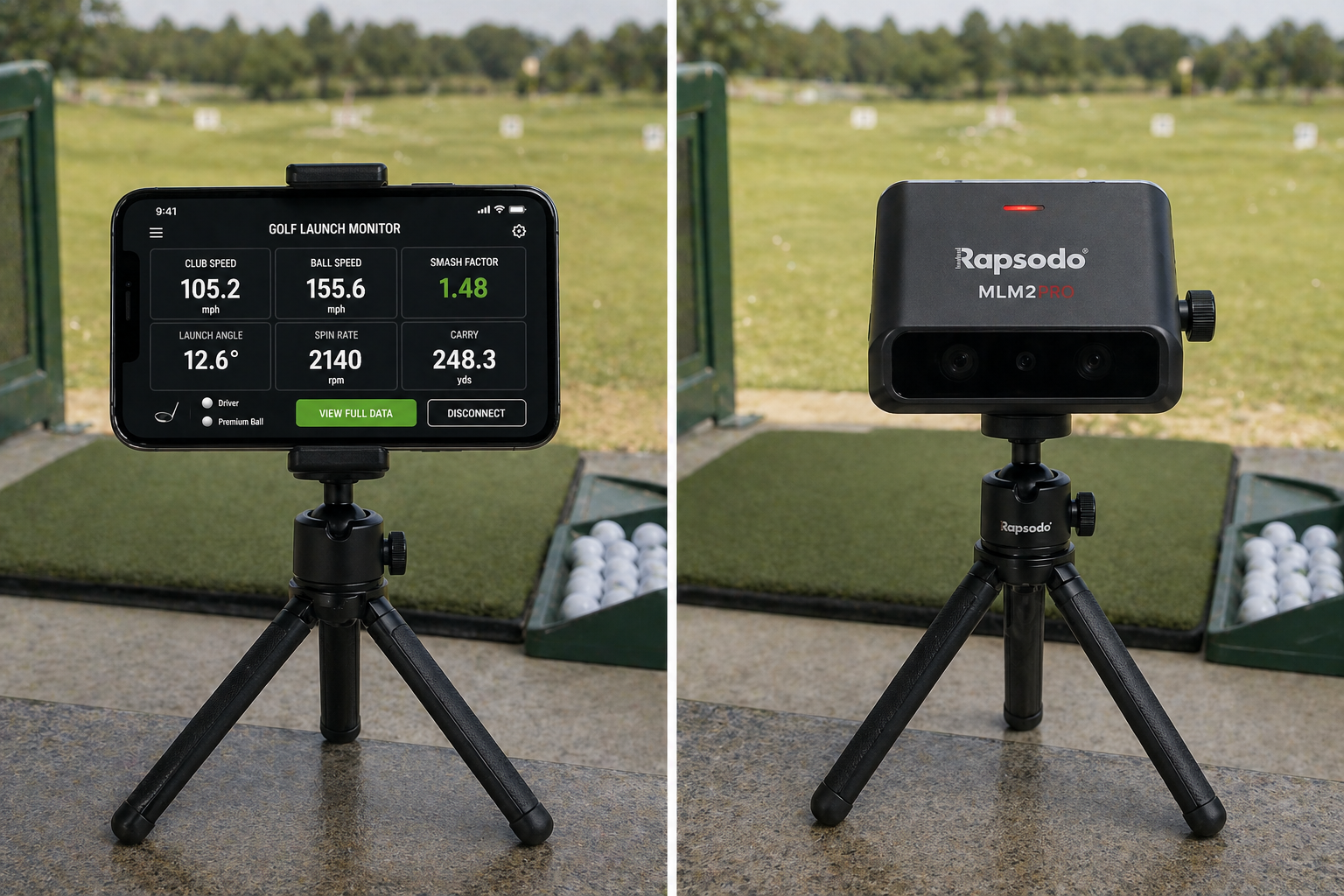
iPhone Launch Monitor App vs Hardware — Which Is Right for You?
By Asaru Labs | Golf Technology | 9 min read
The launch monitor market in 2026 gives golfers more choices than ever — from free iPhone apps to dedicated radar units at $250, $700, and well beyond. Each category makes real promises. Each has real trade-offs. The question is not which is objectively best. It is which one is right for your specific situation, budget, and goals.
This guide compares iPhone launch monitor apps against the main dedicated hardware options — including the Rapsodo MLM1, the Rapsodo MLM2PRO, and the Garmin R10 — on every dimension that actually matters to an amateur golfer: accuracy, cost, portability, metrics, and what each category gets wrong that the other gets right.
Disclosure: This article is published by Asaru Labs, the developer of the Golf Launch Monitor app. Hardware devices are reviewed based on publicly available specifications, user reviews, and independent testing coverage as of April 2026. We have aimed to represent each product fairly.
The three categories of launch monitor
Before comparing specific products, it helps to understand how the market is structured. There are effectively three tiers:
| Category | Examples | Price range | Primary technology |
|---|---|---|---|
| iPhone apps | Golf Launch Monitor, ShotVision, GolfTrak, Golfboy | Free to ~$8/month | Computer vision + ML + physics modelling |
| Entry hardware | Rapsodo MLM1, Garmin R10, Swing Caddie SC4 | $200–$500 + subscription | Doppler radar (some + camera) |
| Mid-range hardware | Rapsodo MLM2PRO, SkyTrak+, Bushnell Launch Pro | $699–$2,000 + subscription | Dual camera + Doppler radar hybrid |
Premium hardware (TrackMan, GCQuad, Foresight GCHawk) starts at $5,000 and is outside the scope of this comparison — those products are designed for professional fitting and teaching, not personal amateur use.
Accuracy: what the data actually shows
Accuracy is the most important question for most golfers considering the jump from an app to hardware. Here is an honest breakdown by metric across the three categories:
| Metric | iPhone app (Golf Launch Monitor) |
Entry hardware (Rapsodo MLM1, Garmin R10) |
Mid-range hardware (Rapsodo MLM2PRO) |
|---|---|---|---|
| Ball speed | Very good (±2–4%) | Excellent (±1–2%) | Excellent (±1%) |
| Launch angle | Very good (±1–2°) | Excellent (±1°) | Excellent (±1°) |
| Carry distance | Good (±3–6 yards) | Very good (±2–4 yards) | Excellent (±1–3 yards) |
| Spin rate | Reasonable (±10–15% — physics-derived) | Good (Doppler-assisted) | Very good (±200–300 rpm with RPT balls) |
| Club head speed | Good (derived from smash factor) | Very good (direct radar) | Excellent (direct radar) |
| Club path | Not available | Not available | Yes (directly measured) |
| Angle of attack | Not available | Not available | Yes (directly measured) |
| Shot dispersion | Yes | Yes | Yes |
The honest summary: for ball speed, launch angle, and carry distance — the three metrics that matter most for most amateur golfers — a well-set-up iPhone app is meaningfully accurate and well within a useful margin for practice and course management. The accuracy gap versus entry-level hardware on these core metrics is real but smaller than most people expect.
Where hardware genuinely pulls ahead is spin rate precision, direct club head speed measurement, and — specifically for the MLM2PRO — directly measured club path and angle of attack. These additional metrics are genuinely valuable for serious golfers working on specific swing mechanics. They are not available from any camera-only app at any price point.
The spin asterisk: The Rapsodo MLM2PRO produces its best spin accuracy using proprietary RPT (Rapsodo Precision Technology) balls — specially marked Callaway or Titleist Pro V1 balls. Without RPT balls, spin accuracy drops meaningfully. This means the spin advantage of hardware requires a recurring cost in premium marked balls. The Golf Launch Monitor app works with any standard golf ball.
The true cost comparison
The sticker price of hardware tells only part of the story. Here is the full cost picture over 12 months:
| Option | Hardware cost | Subscription (12 months) | Accessories needed | Year 1 total |
|---|---|---|---|---|
| Golf Launch Monitor (free) | $0 | $0 | Tripod (~$20) | ~$20 |
| Golf Launch Monitor (premium) | $0 | ~$36–$60/year | Tripod (~$20) | ~$56–$80 |
| Rapsodo MLM1 | ~$250 | $99/year (Premium) | Tripod included | ~$349 |
| Garmin R10 | ~$350–$500 | ~$100/year (full features) | Mat + net if indoors | ~$450–$600 |
| Rapsodo MLM2PRO | $699 | $200/year (Premium — needed for full features) | RPT balls + mat + net if indoors | ~$1,000–$1,300+ |
The cost gap between an app and mid-range hardware is substantial once you account for subscriptions and accessories. The Rapsodo MLM2PRO in particular becomes a $1,000+ investment in year one when you factor in the Premium membership (needed for full spin data and simulator features), RPT balls, a hitting mat, and a net for indoor use. This is worth it for golfers who will genuinely use all those features. It is not worth it for golfers who mostly want to know their ball speed and carry distance at the range.
Portability and convenience
This is where iPhone apps have a genuine, structural advantage that no hardware device can match — not because of better technology, but because of physics.
Your iPhone is already in your pocket at the range. Setup takes 60 seconds: place the tripod, open the app, check the frame, hit. There is no device to charge separately, no Bluetooth or Wi-Fi pairing, no firmware to update, no risk of forgetting it at home. For golfers who practice three to five times per week across multiple venues, this frictionless availability adds up significantly.
Hardware devices require carrying an extra item, charging it separately, setting up a connection between the device and your phone, and in the case of the MLM2PRO, ensuring you have RPT balls in your bag. None of these are deal-breakers — but they add friction that occasionally results in a practice session happening without data simply because setup felt like too much effort.
The frequency effect: A less accurate tool used every session produces more improvement than a more accurate tool used occasionally. The convenience advantage of an iPhone app means it is more likely to actually be used consistently — and consistent measurement is more valuable than occasional precision.
What hardware does better than any app
To be completely fair: there are specific things that dedicated hardware does better than any iPhone app, and these matter for certain golfers.
Direct club path and angle of attack measurement
The Rapsodo MLM2PRO, following its 2025 update, directly measures club path and angle of attack using its radar and dual-camera system — not estimated from ball flight data, but directly tracked. These are two of the most diagnostically valuable metrics in golf instruction. Knowing your exact angle of attack (-4.2°) and club path (-2.1°, out-to-in) tells you far more precisely what is happening at impact than ball flight data alone.
No iPhone-only app currently measures these metrics. If you are working closely with a swing coach on specific mechanical changes, or if you are seriously trying to fix a slice or hook by understanding exactly what your club is doing through impact, the MLM2PRO's directly measured club data is a meaningful advantage over any app.
Indoor reliability at all distances
Hardware devices using Doppler radar are more consistent in low-light and indoor conditions than camera-based apps. The Golf Launch Monitor app works well indoors with good lighting and at least 8 feet of ball flight. But a poorly lit garage or an indoor bay with inconsistent overhead lighting can reduce tracking reliability for any camera-based system. Radar devices are essentially lighting-independent.
Shot tracer video
Several hardware devices — particularly the Rapsodo MLM1 and MLM2PRO — provide video shot tracer: your swing video overlaid with the ball's actual flight path. This is a compelling feature for golfers who want to review their swing alongside the data, and it is not something camera-only apps replicate.
Simulator integration
For golfers who want to play virtual rounds of golf at home, hardware devices — especially the MLM2PRO with E6 Connect and GSPro — provide a more robust simulator experience than any app, with access to tens of thousands of courses and a larger installed user community.
What iPhone apps do better than hardware
Free and generous access to core metrics
The Golf Launch Monitor app provides ball speed, launch angle, spin rate, carry distance, smash factor, and shot dispersion in its free tier. No dedicated hardware device at any price point gives you this level of metric access without a subscription. The Rapsodo MLM1, for example, requires a $99/year Premium membership for spin data and advanced features. The MLM2PRO's full feature set requires a $200/year subscription.
No proprietary accessories required
The MLM2PRO's best spin accuracy requires RPT balls — proprietary marked Callaway or Titleist balls that cost significantly more than standard range balls. The Golf Launch Monitor app works with any standard golf ball. No proprietary accessories, no recurring consumable costs, no risk of running out mid-session.
Always with you
As covered in the portability section: an iPhone is always in your pocket. The lowest friction path to consistent data collection is the tool you always have, not the tool that is theoretically more accurate when you remember to bring it.
The decision framework: which is right for you?
| Your situation | Best choice | Why |
|---|---|---|
| You want to try launch monitor data for the first time | iPhone app (free) | Zero cost, immediate setup, full core metrics in the free tier — no commitment required |
| You practice regularly and want to track improvement over time | iPhone app (premium) | Session export, club management, always with you — highest return on investment for regular range use |
| You want to know your yardages and improve your carry distances | iPhone app | Carry distance accuracy is very good and fully available in the free tier |
| You are working with a swing coach on specific mechanics and want club path and AoA data | Rapsodo MLM2PRO | Only option at this price point with directly measured club path and angle of attack |
| You want to play virtual simulator golf at home as a primary use case | Rapsodo MLM2PRO or GolfTrak app | Hardware for the best simulator experience; GolfTrak app if you want a low-cost entry into sim golf |
| You want entry-level hardware to step up from an app | Rapsodo MLM1 | ~$250 with better radar-based accuracy, shot tracer video, and outdoor performance for golfers who have already used an app and want more |
| You are a teaching professional or serious competitive amateur needing certified data | Premium radar hardware | Absolute accuracy at the highest level requires TrackMan, GCQuad, or Foresight hardware — no mid-range device replaces these for professional use |
Our recommendation for most golfers
For the majority of amateur golfers — anyone who wants to understand their swing data, track improvement, and make better decisions on the course — the honest answer is: start with the iPhone app.
The Golf Launch Monitor app gives you ball speed, launch angle, spin rate, carry distance, smash factor, and shot dispersion in the free tier. Set it up correctly with a $20 tripod, and the accuracy on the metrics that matter most for improvement is well within a useful range. The frictionless portability means it actually gets used — which is worth far more than theoretically better data sitting at home because you forgot to charge the hardware.
If you have used an app consistently for several months, understand your swing data, and want better spin measurement or club-path data to take your game to the next level — that is the right time to look at the Rapsodo MLM1 or MLM2PRO. Hardware upgrades are most valuable once you have already developed the habit of data-driven practice and know specifically what additional metrics you need.
Buying a $700 piece of hardware as your first launch monitor, before you have established a data-driven practice routine, is putting the cart before the horse. The friction of hardware setup means it often ends up used less often — and inconsistent data is the worst possible outcome.
Start with the Golf Launch Monitor app — free, no hardware needed.
Download the app, grab a $20 tripod, and bring real data to your next range session. Ball speed, launch angle, spin rate, carry distance, and shot dispersion — all in the free tier, from your iPhone camera. Build the data-driven practice habit first. Then decide whether you need hardware.
Frequently asked questions
Is a Rapsodo launch monitor more accurate than an iPhone app?
For ball speed and launch angle, the gap is smaller than most people expect — well-set-up iPhone apps using physics-based tracking are typically within 2–4% of radar hardware on these core metrics. Where the Rapsodo MLM2PRO genuinely pulls ahead is spin rate (using RPT balls) and — uniquely — directly measured club path and angle of attack. For carry distance and ball speed tracking for practice purposes, the accuracy difference between a well-set-up iPhone app and entry Rapsodo hardware is unlikely to change your practice outcomes.
How accurate is the Rapsodo MLM1?
The Rapsodo MLM1 uses Doppler radar combined with your phone's camera and is marketed as accurate to within 2% of TrackMan for distance, ball speed, and launch angle. Independent testing generally supports this claim for outdoor use in good conditions. The MLM1 does not measure spin rate — that feature requires the MLM2PRO. At around $250, it is a solid step up from iPhone-only apps for golfers who want more reliable radar-based carry distance and club speed data.
What does the Rapsodo MLM2PRO do that an iPhone app cannot?
Two things that matter significantly: directly measured club path (in-to-out or out-to-in, in degrees) and directly measured angle of attack (how steeply the club is descending or ascending at impact). These were added in the MLM2PRO's 2025 update and are not available from any camera-only app. The MLM2PRO also provides more accurate spin rate measurement using RPT balls, and swing video with shot tracer — neither of which is available in the Golf Launch Monitor app.
Is the Garmin R10 worth buying over an iPhone app?
The Garmin R10 uses Doppler radar and offers reliable ball speed, launch angle, carry distance, and club speed measurements at around $350–$500. It works indoors and outdoors. Compared to an iPhone app, it offers better radar-based accuracy and simulator capability. Compared to the Rapsodo MLM2PRO, it lacks dual cameras, direct club path measurement, and angle of attack. For golfers specifically wanting an affordable indoor simulator setup alongside decent range data, the R10 is a reasonable choice — though it requires a subscription for full features.
Can I use an iPhone launch monitor app instead of buying hardware?
For most amateur golfers, yes. If your goal is to understand your ball speed, carry distances, launch angle, and shot dispersion — and to practice with a feedback loop that actually moves your numbers — a well-set-up iPhone app delivers sufficient accuracy. The Golf Launch Monitor app covers all of these in its free tier. Hardware becomes meaningfully better value when you specifically need club path data, direct angle of attack measurement, or a full simulator experience at home.
What is the cheapest way to get accurate launch monitor data?
A free iPhone launch monitor app plus a $15–20 compact tripod. The Golf Launch Monitor app provides ball speed, launch angle, spin rate, carry distance, smash factor, and shot dispersion in its free tier — all from your existing iPhone. For most golfers, that is everything needed for meaningful data-driven practice, for a total investment of under $25.
golf launch monitor app vs hardwareRapsodo vs iPhone appiPhone launch monitor vs Rapsodo MLM2PROGarmin R10 vs iPhone appbest launch monitor for amateur golferphone launch monitor vs radardedicated launch monitor worth itgolf launch monitor comparison 2026