How to Practice at the Driving Range With Data (Not Just Hitting Balls)

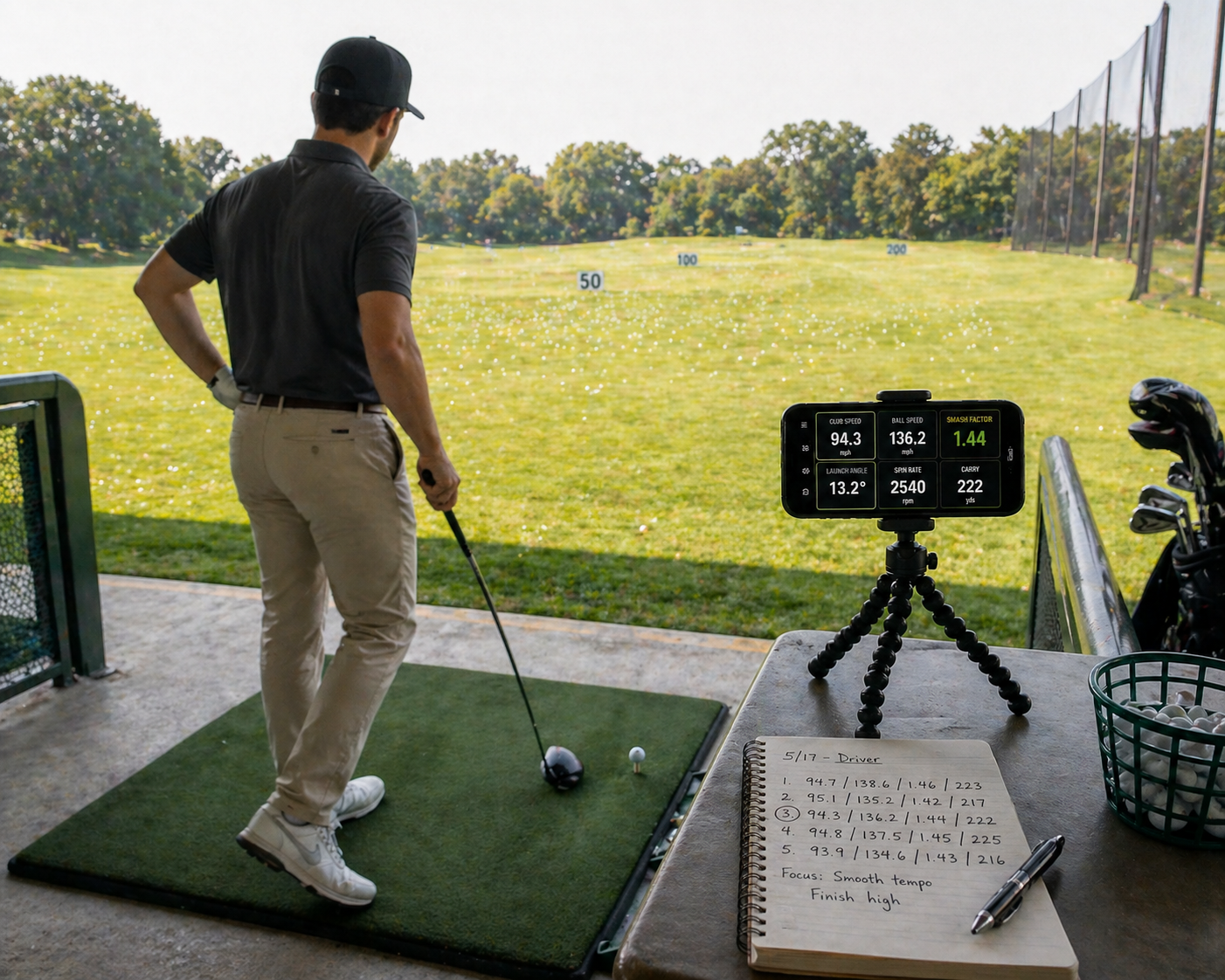
How to Practice at the Driving Range With Data (Not Just Hitting Balls)
By Asaru Labs | Golf Performance | 8 min read
The average golfer hits hundreds of balls at the range every month and barely improves. Not because they lack dedication — but because hitting balls without a feedback loop is not practice. It is repetition. And repetition without measurement just ingrains whatever you are already doing, good or bad.
This guide explains the difference between hitting balls and actually practising, how to structure a data-driven range session that produces measurable improvement, and the specific session plans you can use at your next visit to the range — with real numbers from a launch monitor to verify that what you are working on is actually working.
Turn your next range session into a real practice session — free.
The Golf Launch Monitor app gives you ball speed, launch angle, spin rate, carry distance, smash factor, and shot dispersion on every shot — from your iPhone camera, no hardware needed. Stop guessing whether your practice is working.
Why most range sessions produce almost no improvement
Research on skill acquisition in sport consistently shows that the most common form of golf practice — hitting a bucket of balls at one target with the same club — is among the least effective ways to improve. There are three reasons for this:
No feedback loop
Improvement requires knowing whether what you just did was better or worse than what you did before. Without a launch monitor, golfers rely on ball flight and feel — both of which are unreliable, especially when making swing changes. A swing adjustment that feels completely different often produces ball flight that looks almost identical, and vice versa. Without objective data, you cannot reliably distinguish real improvement from natural shot-to-shot variation.
No defined goal
Arriving at the range with a bucket of balls and a vague sense of "working on my driver" is not a practice plan. An effective practice session has a specific, measurable goal: raise my average driver ball speed from 128 mph to 133 mph over four sessions, or reduce my 7-iron lateral dispersion from 35 yards wide to 25 yards wide by the end of the month. Without a specific target, you have no way to know when you have succeeded — or when you have stopped making progress.
Block practice only
Hitting 40 consecutive balls with the same club at the same target is called block practice. It feels productive and produces temporary improvement during the session — your swing warms up, you find a rhythm, the last few shots feel great. But the research consistently shows that block practice transfers poorly to the course, because the course requires you to produce the right shot on demand from a cold start, on a new lie, with a new target, under pressure. Without random and variable practice, range improvement stays at the range.
The data-driven practice framework
Every effective data-driven range session follows the same four-phase structure, regardless of what you are working on:
Phase 1 — Measure (shots 1–10)
Before changing anything, establish your current baseline with 10 shots hit exactly as you normally would. No extra effort, no conscious adjustments. Just your normal swing. Record the key metrics for what you are working on — if it is driver distance, note average ball speed, smash factor, launch angle, and carry distance. If it is iron consistency, note average carry and lateral dispersion spread.
This baseline has two functions: it gives you an honest starting point for the session, and it gives you something to compare against at the end to verify whether your work produced a real improvement.
Phase 2 — Diagnose (review your data)
Look at your baseline numbers in the Golf Launch Monitor app and ask: what is the single biggest gap between where I am and where I want to be? Not two things, not five things — one thing. This is the constraint that, if fixed, would produce the most improvement. Common findings:
- Smash factor below 1.40 → contact quality is the priority
- Launch angle below optimal for swing speed → angle of attack or tee height
- Spin rate above 3,000 rpm at 95 mph → spin loft and angle of attack
- Lateral dispersion wider than 40 yards → face angle or path consistency
- Carry distance highly variable shot to shot → contact location consistency
Phase 3 — Work (shots 11–40)
Apply one change based on your diagnosis. Hit shots in focused sets of 5–10, checking the data after each set to see whether the target metric is moving. Change nothing else. If after 20 shots the metric has not responded, your diagnosis may be wrong — re-examine the data and consider whether a different variable is more likely the root cause.
Important: do not chase perfection within this phase. You are looking for directional movement — is the metric trending toward your target? A smash factor that moves from 1.37 to 1.41 over 20 shots is a significant win, even if 1.46 is the eventual goal.
Phase 4 — Verify (final 10 shots)
Finish every session by returning to your normal swing with the adjustment in place and hitting 10 shots as you would on the course. Compare the average of these final 10 shots to your opening baseline. Did the target metric improve? By how much? This comparison is your session result — the objective measure of whether the practice produced real change or just temporary feel.
Export and save every session: Use the Golf Launch Monitor app's PDF or CSV export after every session. Over weeks and months, comparing session exports shows you your rate of improvement — and catches regressions before they become entrenched. This longitudinal record is one of the most valuable things a serious amateur golfer can build.
Five specific data-driven session plans
Here are five ready-to-use session plans built around the four-phase framework above. Each one targets a specific metric with a specific goal.
Session plan 1 — Driver distance (ball speed and smash factor)
Goal: Raise average smash factor by 0.04–0.06 and ball speed by 4–6 mph within 3 sessions.
Baseline metrics to record: Ball speed, club head speed, smash factor, carry distance.
Diagnostic check: If smash factor is below 1.40, contact quality is the primary target. Apply impact tape to the face after your baseline set to see your contact pattern.
Work phase focus:
- Raise tee height if baseline contact is low on the face
- Move ball one ball-width forward if contact is consistently centred but smash factor is low — this promotes the upward strike that produces centre-high contact
- Hit 5 shots, check smash factor average, adjust, repeat
Success marker: Final 10-shot average smash factor at least 0.03 higher than baseline average.
Session plan 2 — Driver spin rate reduction
Goal: Reduce average driver spin rate by 300–500 rpm within 2 sessions.
Baseline metrics to record: Spin rate, launch angle, carry distance.
Diagnostic check: If spin is above 3,000 rpm at 85–95 mph swing speed, the most likely cause is a downward angle of attack. If launch angle is also low (below 10°), this confirms it.
Work phase focus:
- Raise tee height by half an inch — this promotes higher contact and a shallower attack angle
- Add spine tilt away from the target at address (trail shoulder slightly lower)
- Focus on staying behind the ball through impact rather than driving weight aggressively forward
- Check after every 5 shots — you are looking for spin rate dropping AND launch angle rising simultaneously
Success marker: Final 10-shot average spin rate at least 250 rpm lower than baseline, with launch angle equal or higher.
Session plan 3 — Iron consistency (dispersion tightening)
Goal: Reduce 7-iron lateral dispersion spread by 8–12 yards within 3 sessions.
Baseline metrics to record: Lateral dispersion width, carry distance spread, smash factor variance.
Diagnostic check: Look at your dispersion pattern in the app. Are misses predominantly one side (suggests consistent face angle bias), or both sides equally (suggests path variability or contact location inconsistency)?
Work phase focus for one-sided misses:
- Check grip — a strong grip promotes a closed face and a left miss for right-handed golfers; a weak grip does the opposite
- Focus on a square face at the top of the backswing as a reference point
- Hit 10 shots focusing purely on face direction at impact, not swing path
Work phase focus for both-sided misses:
- Use an alignment stick gate drill — two tees either side of the ball at the width of the club head — to force path consistency
- At reduced speed (70%), focus on impact contact location using impact tape
- Build back to full speed while maintaining the contact awareness
Success marker: Final 10-shot lateral spread at least 8 yards tighter than baseline spread.
Session plan 4 — Carry distance calibration (full bag)
Goal: Establish accurate average carry distance for every club in the bag.
This session is measurement, not improvement work — its output is a yardage chart you will use on the course, not a swing change.
Structure:
- 15 shots per club, normal swing throughout, no extra effort
- Record average carry and note the spread (shortest and longest carry in the set)
- Split across 2–3 sessions to avoid fatigue affecting later readings
- Export data and build a personal distance chart with average carry and reliable carry (average minus 7%) for each club
Success marker: Complete distance chart for full bag with at least 12 shots per club recorded.
Session plan 5 — Random practice transfer session
Goal: Transfer a recently ingrained change from block practice to course-like performance.
When to use this session: After 2–3 block practice sessions where a specific metric has improved in the work phase but you are not yet sure the change will hold under pressure.
Structure:
- Never hit the same club twice in a row
- Change your target after every shot — aim at different markers, distances, and angles
- After each shot, check your target metric in the app before moving to the next club
- Hit 30 shots total, recording every metric as usual
- At the end, compare the average of your target metric to your best block practice session average
Success marker: Target metric in random session within 10% of best block session average. If it drops significantly more than 10%, more block practice is needed before the change is ready for course conditions.
The 80% rule: A swing change is ready for the course when it holds up in random practice at approximately 80% of the quality it shows in block practice. Do not take a change onto the course before you have verified it holds in random practice — you will lose confidence in the change when it fails under pressure, and abandon something that was genuinely working.
How to track progress across sessions
A single session tells you whether today's practice moved the needle. A series of sessions tells you whether your improvement is real and durable. Here is how to track progress effectively using the Golf Launch Monitor app:
Keep one metric as your primary target per block
Choose one metric to improve per 3–4 week practice block. Trying to improve smash factor, spin rate, and dispersion simultaneously splits your focus and makes it nearly impossible to identify which practice method is producing which result. One metric, one block. When that metric reaches your target, move to the next.
Record your session baseline every time
Every session starts with 10 shots hitting normally. The average of these 10 shots is your session baseline. Plotting session baselines over time — week by week — gives you a clear improvement curve for your target metric. This is far more informative than comparing individual best shots, because it removes the noise of day-to-day variation.
Export every session immediately
Do not rely on memory. Export the session data from the app as a PDF or CSV immediately after the session. Save these files in a folder by date. Once a month, review them and compare session baselines for your target metric. If the metric is trending upward session by session, your practice method is working. If it is flat or trending down, change the method.
The five practice mistakes data instantly exposes
One of the most valuable things about data-driven practice is that it makes common practice mistakes immediately visible — rather than letting them quietly waste months of effort.
| The mistake | What it looks like without data | What the data shows |
|---|---|---|
| Working on the wrong thing | "I practised hard but nothing changed on the course" | Target metric not moving; a different metric is actually out of range |
| Confusing feel with real change | "That swing felt so much better" — but carries the same distance | Ball speed and carry unchanged despite feeling different |
| Abandoning a change too early | "I tried that tip and it didn't work after one session" | Metric was improving across sessions but felt worse on individual shots |
| Keeping a change that is not working | "I've been working on this for six weeks, it must be getting better" | Session baselines flat for six consecutive sessions — method is not working |
| Over-practising a strength | Always hitting driver because it feels good | Driver data already near ceiling; biggest gap is in a different club or metric |
THE PRACTICE PAYOFF
Golfers who switch from unstructured range sessions to data-driven practice with a specific target metric typically reach their improvement goals in one-third of the time compared to feel-based practice. Not because they work harder — but because they know immediately after every shot whether what they just did moved the number. That feedback loop is the entire difference between practice that compounds and practice that spins its wheels.
Make your next range session count — free.
Download the Golf Launch Monitor app and bring real data to the range. Ball speed, smash factor, launch angle, spin rate, carry distance, and shot dispersion on every shot — from your iPhone, no hardware needed. Practice with a feedback loop and start improving in the direction that actually matters.
Frequently asked questions
How is data-driven golf practice different from normal range practice?
Data-driven practice has three things a typical range session lacks: a specific measurable goal, an objective feedback loop after every shot, and a way to verify whether improvement is real. Using the Golf Launch Monitor app provides all three — you know your baseline, you see every shot's data immediately, and you can compare your final 10 shots to your opening 10 to confirm whether your session produced genuine improvement.
How many balls should I hit in a practice session?
Quality over quantity. A focused 40-ball session following the four-phase framework produces more lasting improvement than 150 balls hit without structure. The ideal range is 40–60 balls for a focused single-metric session, or up to 80 balls for a full-bag carry distance calibration. More than that and fatigue starts to affect your swing and distort your data.
What should I work on first at the range?
Measure first and let the data tell you. Hit 10 normal shots with your driver and 10 with your most-used iron, then look at your key metrics — smash factor, launch angle, spin rate, and dispersion. The metric furthest from its target range is your highest-priority focus. Do not assume you know what to work on before you have looked at the numbers.
How do I know if a swing change is actually working?
Compare your session baseline (first 10 shots) to your verification set (final 10 shots) and check whether the target metric moved in the right direction. Then compare session baselines across multiple sessions over two to three weeks. If the metric trends upward session over session, the change is working. If it is flat or inconsistent, the change is not producing real improvement and should be reconsidered.
Should I always use the same club for practice?
No. Block practice — hitting the same club repeatedly — is useful for ingraining a specific change, but it transfers poorly to the course on its own. Once a change shows improvement in block practice across 2–3 sessions, switch to random practice: vary your club and target on every shot. This forces the change to hold up under variable conditions, which is how the course actually works.
Can I use the Golf Launch Monitor app indoors for practice?
Yes. The Golf Launch Monitor app works indoors as long as you have at least 8 feet of ball flight for the camera to track. An indoor net set at least 8 feet in front of the ball gives you enough flight data for accurate carry distance, ball speed, launch angle, and spin rate readings — making it perfectly viable for home practice sessions as well as range visits.
how to practice golf at the range with datadata-driven golf practicegolf range practice tipseffective golf practice sessionlaunch monitor practice drillsstructured golf practice plangolf improvement with datadriving range practice routine