How to Measure Vibration With Your iPhone (Guide)

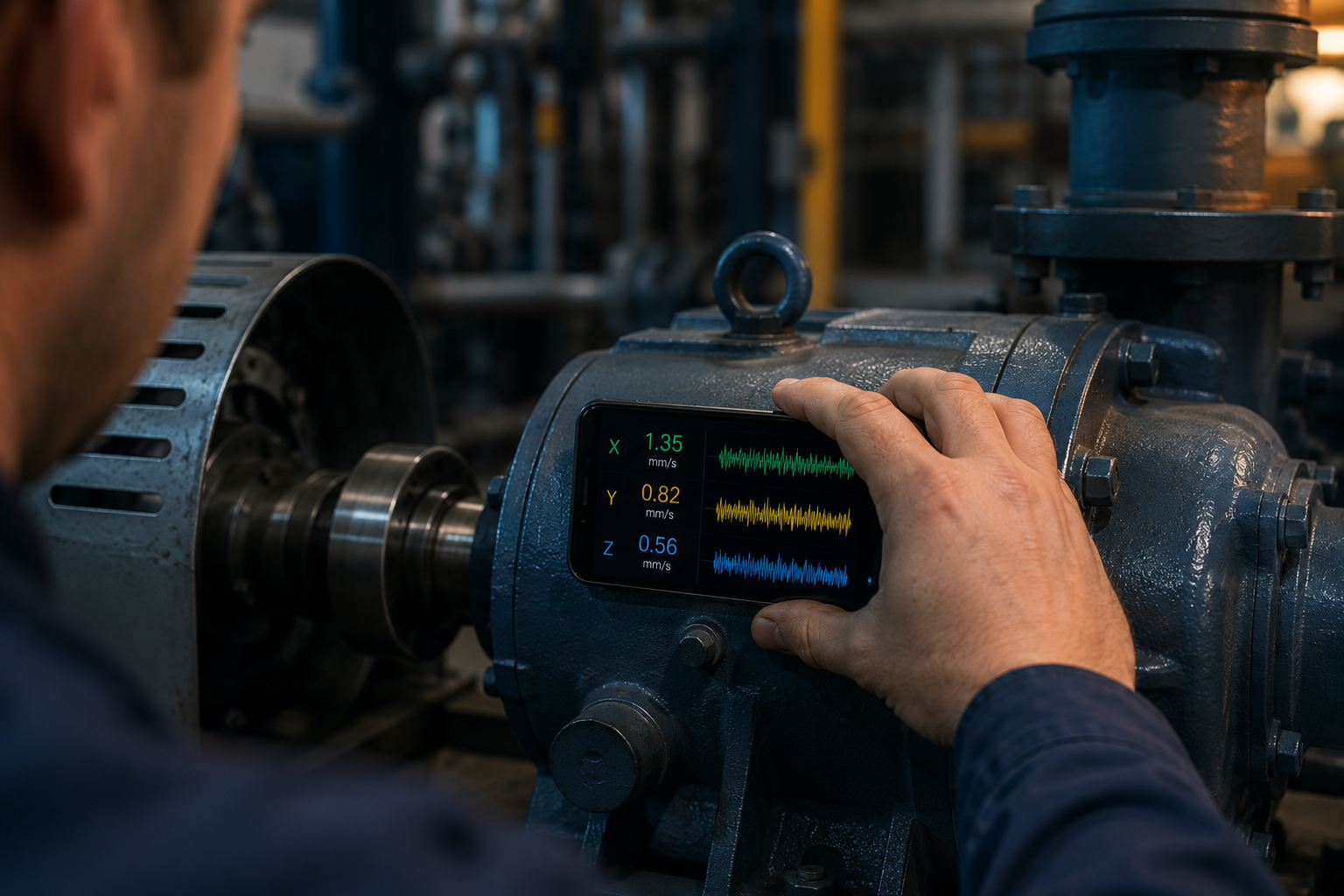
How to Measure Vibration With Your iPhone (Step-by-Step)
Yes — you can measure vibration with your phone. Every modern iPhone and Android contains a three-axis accelerometer, the same type of sensor used in dedicated vibration meters, and with the right app it will give you a live reading in mm/s good enough for screening machines, spotting imbalance, and tracking a machine’s health over time. You do not need a $2,000 data collector to get started.
This guide answers the two questions everyone asks — can a phone accelerometer really measure vibration, and exactly how to do it properly — plus the honest limits of what a phone can and cannot detect. To follow along, download the free Vibration Detector Sensor app and you can take your first reading in under a minute.
Take your first vibration reading now
Live RMS & peak in mm/s, three-axis readout and a frequency spectrum — all from your iPhone’s built-in accelerometer. No extra hardware.
Can you really measure vibration with a phone accelerometer?
The short answer is yes, with one caveat: a phone is a screening and trending tool, not a calibrated laboratory instrument. Your phone’s accelerometer is a MEMS sensor that detects acceleration along three axes (X, Y and Z) many times per second. Vibration is rapidly changing acceleration, so the sensor picks it up directly — an app then converts that raw signal into the values technicians actually use: overall RMS velocity in mm/s, peak acceleration, and a frequency spectrum.
This is not a gimmick. Professional reliability technicians routinely recommend phone apps for daily trend checks between formal surveys, and research has shown smartphone accelerometers are sensitive enough to capture the natural frequencies of real structures. For the most common monitoring task — tracking a motor, pump or fan and catching it when it starts to degrade — a phone running the accelerometer-based meter does the job well.
What you’ll need
- An iPhone or Android phone with a working accelerometer (every modern phone has one).
- A vibration meter app — the Vibration Detector Sensor app is free to start and shows live RMS, peak and spectrum.
- A thin or removable case — a thick case dampens vibration and skews readings.
- Optional: a small foam pad — improves contact and protects the phone on strongly vibrating surfaces.
How to measure vibration with your iPhone, step by step
- Open the app and let the sensor settle. Place the phone on a flat, still surface for a few seconds so the baseline zeroes out.
- Get the machine running normally. Measure under normal load and speed, warmed up — not at idle or start-up.
- Press the phone firmly against the bearing housing. Hold it flat and steady on a solid metal part of the machine, ideally over a bearing. Avoid loose guards and sheet-metal covers.
- Hold still and let the reading stabilise. Wait a few seconds for the RMS value in mm/s to settle.
- Record the value in all three directions. Take a reading horizontal, vertical and axial — the highest of the three characterises the machine.
- Save the session. Log the reading so you can build a baseline and compare future measurements.
That is the entire workflow. Once you have done it once, each subsequent check takes seconds, and the sensor app stores each reading so a slow upward trend becomes visible over weeks.
How to take an accurate reading
The single biggest factor in phone vibration measurement is coupling — how well the phone is mechanically connected to the vibrating surface. A few habits make your readings repeatable and trustworthy:
- Remove or thin out the case. Rubber and foam cases absorb vibration before it reaches the sensor.
- Press firmly and consistently. Loose contact under-reads; the same firm pressure each time keeps readings comparable.
- Use the same spot and direction every time. Mark the measurement point so your trend reflects the machine, not your hand position.
- Measure under the same conditions. Same load, same speed, same temperature — consistency is what makes a baseline meaningful.
✓ Pro tip: Record a baseline reading on every healthy machine the first time you measure it. A single number means little on its own, but a clear rise from a known-good baseline is an unambiguous early warning — and trend is exactly what a phone, always in your pocket, is perfect for capturing.
Take readings the same way each visit using the vibration meter, and your phone becomes a genuinely reliable health indicator.
What a phone accelerometer can and can’t measure
Being honest about the limits is what separates useful screening from false confidence. Here is the realistic picture:
| A phone does well | A phone struggles with |
|---|---|
| Overall RMS velocity (mm/s) for screening | High-frequency bearing & gear defect frequencies |
| Low-to-mid frequency vibration (roughly up to 50 Hz) | Compliance-grade, calibrated acceptance testing |
| Imbalance (1×) and misalignment (2×) | Very small-amplitude vibration below the sensor floor |
| Trending and baseline comparison over time | Relative shaft vibration (needs proximity probes) |
In practice, a phone accelerometer captures the low-to-mid frequency band where the most common machine faults live, which covers the fundamental running speed of most motors and the imbalance and misalignment peaks that come with it. What it cannot reach are the high-frequency signatures of early bearing and gear wear, which sit well above a phone’s usable range. For those, a dedicated analyser is the right tool — but for everyday triage, the app covers the ground that matters most.
How to interpret your reading
Once you have a number, the quick rule for most machines is: under about 2.8 mm/s RMS is good, 2.8–4.5 mm/s is worth watching, and above 4.5 mm/s calls for action. To go further, switch to the frequency spectrum: a dominant peak at the running speed means imbalance, a peak at twice the running speed means misalignment. The accelerometer tool shows both the overall mm/s value and the dominant frequency, so you can move from “is this bad?” to “why is this bad?” in the same session.
Your phone is already a vibration meter — unlock it
Live RMS & peak in mm/s, a dominant-frequency spectrum, session logging and CSV export. Everything in this guide, in one free app.
► Get Vibration Detector Sensor on the App Store | Explore the app →
Note: A smartphone accelerometer is excellent for screening, trending and learning, but it is not a substitute for a certified, calibrated vibration analyser when compliance-grade or high-frequency measurements are required.
Frequently Asked Questions
Can you measure vibration with a phone?
Yes. Every modern smartphone has a built-in three-axis accelerometer that detects acceleration, which is what vibration is. With a vibration meter app, the phone reports overall RMS velocity in mm/s, peak values and a frequency spectrum — enough for screening machines and tracking their health over time.
How accurate is a phone accelerometer for measuring vibration?
Accurate enough for screening and trending, but not for calibrated compliance work. The biggest variable is coupling — how firmly and consistently the phone contacts the surface. With good technique and the same measurement point each time, a phone gives repeatable, trustworthy readings for everyday condition monitoring.
What app measures vibration on an iPhone?
A dedicated vibration meter app such as the Vibration Detector Sensor app turns the iPhone’s accelerometer into a live meter showing RMS velocity, peak acceleration, three-axis values and a frequency spectrum, with session logging and CSV export for keeping records.
Do I need to remove my phone case to measure vibration?
A thick rubber or foam case should be removed or swapped for a thin one, because it absorbs vibration before it reaches the sensor and causes under-reading. A slim hard case has minimal effect. The key is to measure the same way every time so your readings stay comparable.
What is the frequency range of a phone accelerometer?
A phone’s built-in accelerometer reliably captures the low-to-mid frequency range, roughly up to about 50 Hz, which covers the fundamental running speed and imbalance and misalignment peaks of most rotating machines. High-frequency bearing and gear defect signatures sit above this range and need a dedicated analyser.
Can an iPhone measure machine RPM from vibration?
Yes, indirectly. The frequency spectrum shows the dominant vibration frequency in Hz, and multiplying by 60 converts it to RPM. Since a healthy machine’s strongest vibration usually occurs at its running speed, the dominant peak often corresponds directly to the machine’s RPM.
how to measure vibration with iphonecan you measure vibration with a phonephone accelerometer vibrationsmartphone vibration metermeasure vibration with smartphoneiphone vibration measurementhow accurate is phone accelerometervibration app iphone