How to Lower Your Driver Spin Rate — Causes, Fixes, and Ideal Numbers

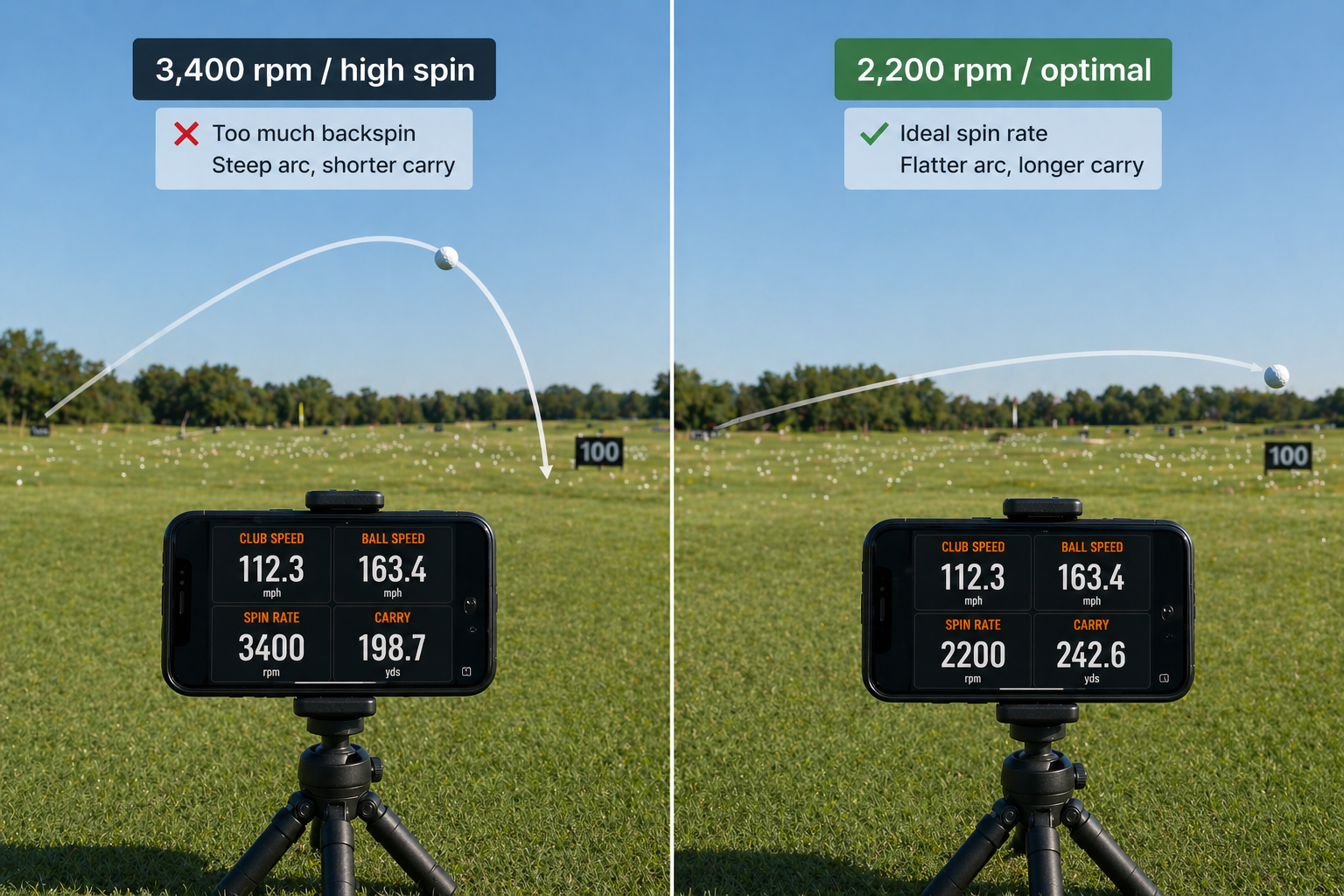
How to Lower Your Driver Spin Rate — Causes, Fixes, and Ideal Numbers
By Asaru Labs | Golf Performance | 8 min read
High driver spin is one of the most common and most fixable distance killers in amateur golf. A golfer swinging at 95 mph with 3,500 rpm of spin can easily be 25–35 yards shorter than they should be — not because of anything wrong with their swing speed, but purely because of too much backspin robbing carry and forward momentum.
This guide covers exactly what spin rate is, what your numbers should be for your swing speed, the four root causes of excessive driver spin, and the practical fixes you can verify with real data from a launch monitor.
See your driver spin rate after every shot — free.
The Golf Launch Monitor app tracks spin rate, launch angle, ball speed, and carry distance from your iPhone camera — no hardware needed. Bring it to the range and start fixing your spin numbers today.
What is spin rate and why does it matter for distance?
Spin rate is the number of times the golf ball rotates per minute after leaving the clubface, measured in rpm (revolutions per minute). With a driver, the ball spins on a predominantly backward axis — backspin — which creates aerodynamic lift that keeps the ball airborne. The right amount of spin produces a high, stable trajectory with maximum carry. Too much spin causes the ball to climb steeply, stall in the air, and fall short of its potential. Too little spin produces a low, knuckling flight that drops out of the sky early.
The key relationship to understand is this: spin rate and launch angle work together. A high spin rate is not automatically bad if it is paired with a low launch angle — the combination can still produce a reasonable ball flight. But the most distance-efficient driver shot has both a high enough launch angle and a low enough spin rate that the ball launches high and stays airborne on a long, shallow arc. Getting this combination right is where most amateur golfers leave the most distance behind.
Optimal driver spin rate by swing speed
The ideal driver spin rate is not a single number — it shifts depending on your swing speed. Faster swingers generate more lift from ball speed alone, so they need less spin to stay airborne and benefit most from a lower, more penetrating trajectory. Slower swingers need more spin to keep the ball in the air long enough to maximise carry.
| Driver swing speed | Optimal spin rate | High spin zone (losing distance) | Low spin zone (loses stability) |
|---|---|---|---|
| Under 75 mph | 2,600–3,200 rpm | Above 3,600 rpm | Below 2,200 rpm |
| 75–85 mph | 2,400–3,000 rpm | Above 3,400 rpm | Below 2,000 rpm |
| 85–95 mph | 2,200–2,800 rpm | Above 3,200 rpm | Below 1,800 rpm |
| 95–105 mph | 2,000–2,600 rpm | Above 3,000 rpm | Below 1,700 rpm |
| 105–115 mph | 1,800–2,400 rpm | Above 2,800 rpm | Below 1,500 rpm |
| 115+ mph | 1,700–2,200 rpm | Above 2,600 rpm | Below 1,400 rpm |
How to read this table: Find your swing speed bracket, then check your current spin rate average from the Golf Launch Monitor app. If your spin rate is above the "high spin zone" threshold for your speed, you are almost certainly losing 15–35 yards of carry and the fixes below directly apply to you.
What high driver spin actually costs you in distance
To make this concrete, here is what excessive spin does to carry distance at a typical amateur swing speed of 95 mph:
| Spin rate (at 95 mph) | Launch angle | Carry distance | Distance lost |
|---|---|---|---|
| 2,200 rpm (optimal) | 13° | 242 yards | — |
| 2,800 rpm (borderline) | 12° | 228 yards | −14 yards |
| 3,400 rpm (high) | 10° | 215 yards | −27 yards |
| 4,200 rpm (very high) | 8° | 200 yards | −42 yards |
That bottom row — 42 yards of carry lost purely from excessive spin, with the same swing speed — is not unusual among amateur golfers. And none of that distance gap requires a faster swing to fix. It requires fixing impact conditions.
The four root causes of high driver spin
Excessive backspin on a driver almost always traces back to one or more of these four impact conditions. Identifying which one applies to you is the key to fixing it efficiently.
Cause 1 — Negative angle of attack (hitting down on the driver)
This is the most common cause of high spin among amateur golfers. When you hit down on the driver — a negative angle of attack — you increase the effective spin loft at impact. Spin loft is the gap between your dynamic loft and your angle of attack. The bigger that gap, the more spin is generated.
A downward attack of -4° on a driver with 12° of dynamic loft creates a spin loft of 16°. The same driver with a +3° upward attack creates a spin loft of just 9° — roughly halving the spin rate, while also raising launch angle. This is why angle of attack is the single most impactful variable for driver spin.
How to spot this: If your spin rate is high AND your launch angle is low, a downward attack angle is almost certainly involved.
Cause 2 — Low-face contact
Where you strike the ball on the face matters enormously for spin. Strikes low on the driver face simultaneously reduce launch angle and increase backspin through gear effect — the exact opposite of an efficient driver impact. A low-face strike can add 500–1,000 rpm of spin versus a centred strike, even with an identical swing.
How to spot this: Use foot powder spray or impact tape on the face to see exactly where you are making contact. Consistent strikes below centre are a direct spin problem.
Cause 3 — Too much dynamic loft at impact
Dynamic loft is the actual loft delivered at impact. A flippy, scoopy release — where the wrists break down before contact — adds significant dynamic loft, which drives up spin rate. Interestingly, this often produces shots that look high and long in the air but fall well short of their expected carry, because the extra spin is converting forward energy into vertical height instead.
How to spot this: High spin rate combined with a very high launch angle (above 16° for most amateurs) often signals too much dynamic loft from an early release.
Cause 4 — Wrong golf ball for your swing speed
High-compression tour balls (Pro V1x, TP5x, Chrome Soft X) are designed for fast swing speeds. At slower speeds they compress less efficiently and produce more spin than intended. If your swing speed is below 90 mph and you are playing a tour ball, switching to a mid-compression or low-compression ball designed for your speed range can reduce spin by 200–400 rpm with no swing change at all.
How to spot this: If your spin rate is consistently high across all ball positions and tee heights, and your contact is fairly centred, ball choice is worth investigating.
How to fix high driver spin: step-by-step
Fix 1 — Shallow your angle of attack
The goal is to arrive at impact with the clubhead moving slightly upward — a positive angle of attack of +2° to +4°. Here are the most effective setup and swing adjustments:
- Move the ball forward: Position the ball opposite your lead heel or just inside it. This encourages the club to reach its lowest point before the ball, arriving at impact on an upward path.
- Raise your tee height: Tee the ball so roughly half sits above the top of the driver face. A low tee invites a steep, downward strike. A high tee promotes the shallow, upward contact that reduces spin loft.
- Add trail shoulder tilt at address: Drop your trail shoulder slightly lower than your lead shoulder at address. This pre-sets a slight tilt away from the target that encourages an upward strike through the impact zone.
- Keep more weight on your trail side through impact: Unlike iron shots, the driver benefits from staying slightly "behind the ball." Aggressively transferring all your weight to the lead side steepens the attack angle and spikes spin.
Measure it: Apply the tee height and ball position change, hit 10 shots, and check your average spin rate in the Golf Launch Monitor app. If spin drops and launch angle rises, you are heading in the right direction. If spin barely moves, the issue is likely face contact — move to Fix 2.
Fix 2 — Move contact higher on the face
Higher contact on the driver face reduces spin through gear effect. The curved face creates a downward tilt of the spin axis on high strikes, which reduces effective backspin. Here is how to promote higher contact:
- Raise the tee height as described above — this naturally moves the strike higher on the face
- Feel like you are "hitting up through the ball" — this encourages the clubhead to be rising as it meets the ball, promoting high-face contact
- Use impact tape or foot powder spray to confirm your contact location is moving upward after each adjustment
Fix 3 — Reduce dynamic loft (firm up your lead wrist)
If your spin rate is high and your launch is also very high — both above your target windows simultaneously — the issue is likely too much dynamic loft from a flippy release. The fix is maintaining a firmer, flatter lead wrist through impact:
- Focus on keeping your lead wrist flat or very slightly bowed through impact, rather than allowing it to cup (bend backward)
- Think of the back of your lead hand facing the target at impact — this cues the proper position
- Practice slow-motion impact positions, pausing at contact to check wrist angle before building back to full speed
Fix 4 — Adjust your driver loft setting
Most modern drivers have adjustable hosels that allow you to add or remove 1–2° of loft. If your impact conditions are fundamentally sound (good angle of attack, centred contact) but spin is still running above your target range, reducing driver loft by 1° is a straightforward equipment fix. Lower loft means less dynamic loft delivered at impact, which directly reduces spin loft and spin rate.
Important: Do not reduce driver loft as a first step. If your angle of attack is significantly negative, reducing loft will lower launch angle further and make your trajectory worse, even if spin drops slightly. Fix angle of attack and contact location first. Loft adjustment is a fine-tuning step, not a primary fix.
Fix 5 — Match your ball to your swing speed
If your swing speed is below 90 mph and you are playing a premium tour ball, consider switching to a mid-compression model designed for your speed range. Balls like the Titleist Tour Soft, Callaway Supersoft, or Srixon Soft Feel are engineered to produce less spin at lower swing speeds while maintaining feel. The spin reduction will not be dramatic — typically 200–400 rpm — but it costs nothing from a swing standpoint and can be verified immediately with a comparison session.
How to use launch monitor data to fix spin efficiently
The critical advantage of having real spin rate data is that you can verify whether each fix is actually working — rather than guessing based on how the ball looks in flight, which is unreliable when you are in the middle of making swing changes.
Here is a simple protocol for a spin-reduction practice session using the Golf Launch Monitor app:
- Establish your baseline: Hit 10 drives with your normal setup. Note your average spin rate and average launch angle. This is your starting point.
- Apply Fix 1 only: Move the ball forward one ball-width and raise your tee height. Hit 10 more drives. Did spin drop? Did launch angle rise? If both moved in the right direction, you have confirmed angle of attack was the issue.
- If spin barely moved, apply Fix 2: Focus on high-face contact cues. Hit another 10 drives. Check whether spin responds.
- Never change two variables at once. If you move the ball, raise the tee, change your grip pressure, and alter your swing thought all in one go, you will not know which change moved the needle.
- End the session with your best combination: Once you have found the setup that produces the lowest spin in your optimal window, hit 10 final drives to lock in the feel of the correct impact.
- Export and save: Use the app's PDF or CSV export to save the session. Comparing your spin rate average across multiple sessions over weeks shows you whether the improvement is sticking.
THE DISTANCE PAYOFF
A 95 mph swing with 3,400 rpm of spin carries around 215 yards. The same swing, after fixing angle of attack to produce 2,200 rpm, carries around 242 yards — a gain of 27 yards with zero increase in swing speed. For most amateur golfers, spin rate is the single largest untapped source of free distance in the bag.
What to do if your spin is already too low
While less common, some golfers — particularly those with very shallow swings or who have overcorrected after chasing low spin — produce too little backspin. The result is a low, knuckling trajectory that drops out of the air early and loses both carry and roll. Shots feel and look powerful off the face but land well short.
If your spin rate is below the low spin threshold for your speed bracket (see the table above), the fixes are essentially the reverse of the high-spin solutions:
- Move the ball slightly back in your stance to steepen the attack angle marginally
- Lower tee height to promote a more neutral impact rather than an extreme upward strike
- Consider a higher-lofted driver head if your current loft is very low (8.5° or below) for your swing speed
- Switch to a higher-compression ball if you are using a very soft ball at a moderate-to-fast swing speed
Start measuring your driver spin rate today — free.
Download the Golf Launch Monitor app and bring it to your next range session. See your spin rate, launch angle, ball speed, and carry distance on every drive — from your iPhone, no extra hardware needed. Find out exactly how many yards you are leaving on the table.
Frequently asked questions
What is the ideal driver spin rate for an average golfer?
For a golfer swinging at 85–95 mph — roughly the average amateur range — the optimal driver spin rate is between 2,200 and 2,800 rpm. Above 3,200 rpm at that speed, you are almost certainly losing meaningful carry distance. The Golf Launch Monitor app shows your spin rate after every shot so you know exactly where you stand.
Why is my driver spin rate so high?
The most common cause is a negative angle of attack — hitting down on the driver at impact. This increases spin loft (the gap between dynamic loft and angle of attack), which directly drives up backspin. Other causes include low-face contact, too much dynamic loft from a flippy release, and playing a ball that is too high-compression for your swing speed.
Can I lower driver spin rate without changing my swing?
Yes, to a meaningful degree. Raising tee height, moving the ball forward in your stance, and switching to a lower-compression ball are all setup or equipment changes that reduce spin with no swing change required. These adjustments can drop spin by 300–600 rpm for many golfers. For larger reductions, angle of attack changes are eventually needed — but setup changes are always the right first step.
Does lower spin always mean more distance?
Not always. Spin rate interacts with launch angle — they must be in the right combination together. Very low spin with too low a launch angle produces a low, knuckling shot that loses carry. The goal is to reduce spin into the optimal window for your swing speed while maintaining or improving launch angle. This is why measuring both numbers together with a launch monitor is so valuable — you can see both moving in the right direction simultaneously.
How much distance can I gain by reducing driver spin rate?
For a golfer at 95 mph with spin around 3,400 rpm, reducing to 2,200 rpm through better angle of attack and contact can add 25–30 yards of carry. At slower speeds the gain is proportionally smaller but still significant. At faster speeds, even 200–300 rpm of spin reduction can add 8–12 yards at elite swing speeds where every mph and rpm matters.
Does the Golf Launch Monitor app measure spin rate accurately?
The app derives spin rate from ball trajectory using a D-Plane physics engine — the same physics framework used by professional launch monitor manufacturers. The reading is directionally very accurate and reliable enough for identifying high-spin problems and verifying fixes. The absolute number may differ slightly from a direct Doppler measurement, but for practice and improvement purposes it is well within a useful margin. See our full accuracy breakdown for more detail.
how to lower spin rate on driveroptimal driver spin rate chartdriver spin rate too highreduce golf ball spindriver spin rate by swing speedgolf launch monitor spin rateideal driver spin ratefix high spin driver