Cheap Golf Launch Monitor Alternatives — What Works in 2026

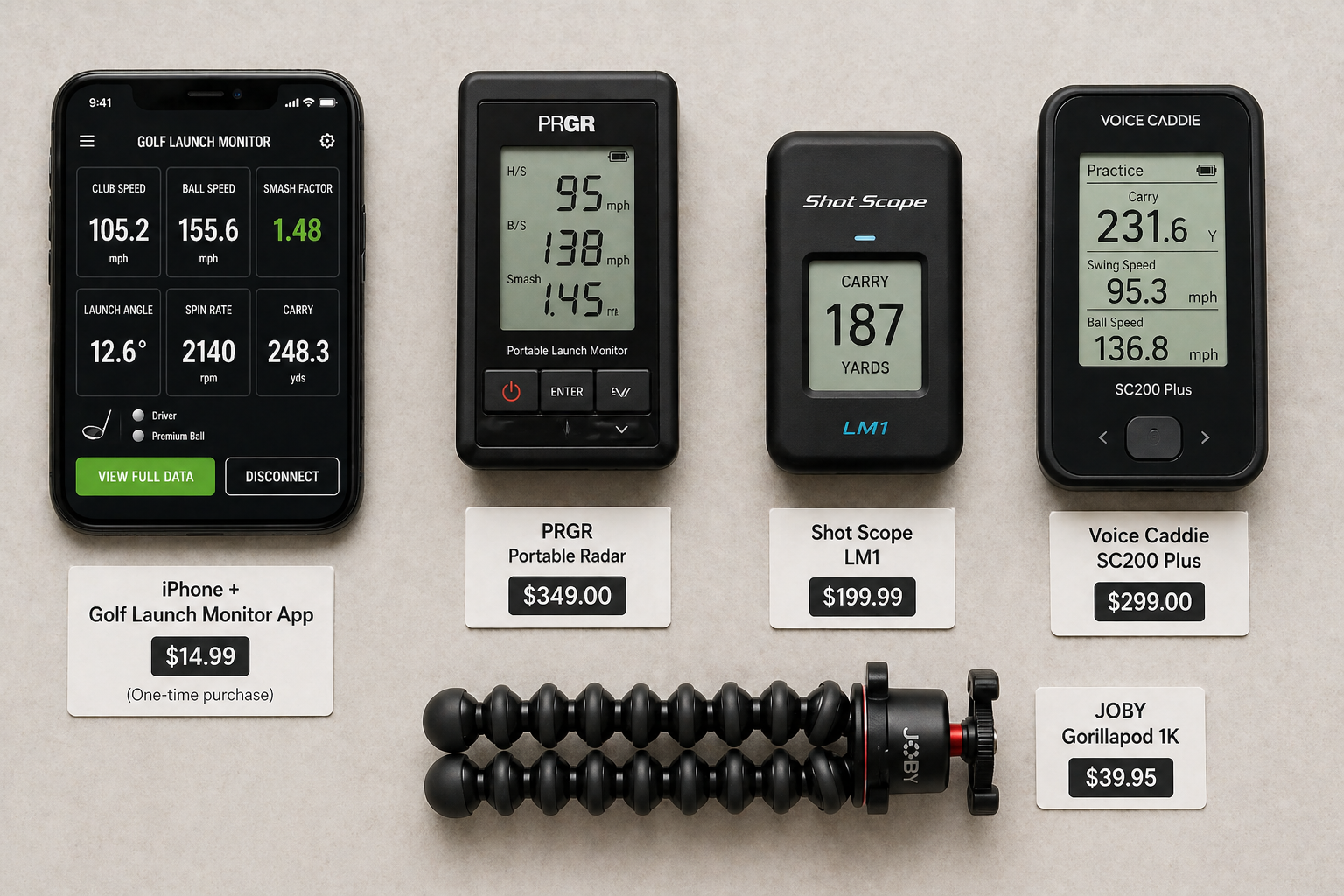
Cheap Golf Launch Monitor Alternatives — What Works in 2026
By Asaru Labs | Golf Performance | 8 min read
Five years ago, getting meaningful launch monitor data meant spending at least $500 on dedicated hardware — and often much more. In 2026, that barrier is gone. There are now genuinely useful options at every price point from free upward, and the cheapest alternatives have closed most of the gap to mid-range hardware on the metrics that actually matter for improvement.
This guide covers the full landscape of budget launch monitor options available in 2026 — what each one costs, what it measures, where it performs well, and where it falls short — so you can find the right fit for your game without overspending.
Disclosure: This article is published by Asaru Labs, the developer of the Golf Launch Monitor app. Competing products are reviewed based on publicly available specifications and independent reviews as of April 2026. We have aimed to represent all options fairly.
What you actually need from a budget launch monitor
Before comparing options, it helps to be clear on what a budget launch monitor needs to deliver to be worth using. There are five metrics that cover the vast majority of what amateur golfers need:
- Carry distance — how far the ball actually flies before landing, not total distance including roll
- Ball speed — the strongest predictor of distance and the clearest read on contact quality
- Launch angle — how the ball leaves the face, which determines how efficiently speed converts to carry
- Club head speed — the raw input of your swing, useful for shaft fitting and speed training
- Spin rate — diagnoses why carry distance is underperforming relative to ball speed
Everything beyond this — simulator integration, shot tracer video, club path, angle of attack — is genuinely valuable but firmly in the "nice to have" category for beginners and most intermediate golfers. A budget option that delivers these five metrics reliably is all you need to start practising with real data.
Option 1 — iPhone launch monitor app (free to ~$8/month)
Best for: Beginners, casual golfers, golfers who want to try launch monitor data before committing any budget.
What you need: An iPhone (iOS 17.6+), the Golf Launch Monitor app (free), and a small tripod (~$15–20).
What it measures (free tier): Ball speed, club head speed, smash factor, launch angle, spin rate, carry distance, shot dispersion.
An iPhone launch monitor app is the cheapest route to all five core metrics by a significant margin. The free tier of the Golf Launch Monitor app includes carry distance, spin rate, and shot dispersion — metrics that competing apps and most sub-$300 hardware lock behind a subscription or do not offer at all.
The accuracy story is honest and worth stating clearly: for ball speed and launch angle, a well-set-up iPhone app is typically within 2–4% of radar-based hardware. Carry distance is within 3–6 yards on average. Spin rate is physics-derived rather than directly measured, so it is directionally reliable but can differ from direct Doppler measurement by 10–15%. For beginners and intermediate golfers — who need to know whether their ball speed is increasing and whether their launch angle is in the right range — this level of accuracy is entirely sufficient.
The one accessory you must have: A stable tripod. A phone balanced on a bag or propped against a water bottle produces unreliable data. A small flexible tripod ($15–20) is the only real cost of this option and makes an enormous difference to accuracy.
Start here — free, no hardware needed.
Download the Golf Launch Monitor app and measure your ball speed, carry distance, launch angle, spin rate, and shot dispersion from your iPhone camera at the range. No hardware required, all core metrics available free.
Limitations: Camera-based tracking works best in good outdoor lighting. Low-light or indoor sessions with poor lighting reduce reliability. Does not provide shot tracer video or directly measured club path and angle of attack.
Option 2 — PRGR Portable Launch Monitor (~$175–200)
Best for: Golfers who want the simplest possible hardware with no app, no subscription, and no setup complexity.
What it measures: Club head speed, ball speed, smash factor, carry distance. No launch angle, no spin rate.
The PRGR has been around for several years and remains one of the best-selling ultra-budget hardware options — not because it is the most capable, but because it is the most frictionless. You turn it on, place it behind the ball, and it displays your carry distance and club speed on its own screen with no phone required. For golfers who just want to know how far they are hitting it and track whether their speed is increasing, it does exactly what it says.
The trade-off is clear: no launch angle, no spin rate, and no session history. The PRGR gives you useful numbers but not the diagnostic depth to understand why those numbers are what they are. It is a distance tracker, not a swing analyser.
Limitations: No launch angle, spin rate, or dispersion data. No app integration or session export. Cannot diagnose launch or spin problems.
Option 3 — Shot Scope LM1 (~$200)
Best for: Beginners wanting an affordable standalone hardware unit with a clean, readable display and no subscription.
What it measures: Club head speed, ball speed, smash factor, carry distance. No subscription required for core use.
The Shot Scope LM1 is one of the newest entries in the sub-$200 hardware category as of 2026 and has drawn strong early reviews for its accuracy relative to its price point. Shot Scope has an excellent reputation in GPS and data products, and that DNA shows in the LM1's build quality and display clarity. Like the PRGR, it is a Doppler radar-based unit that works without a phone and gives you a no-fuss range experience.
It does not measure launch angle or spin rate at this price point, which puts it in the same limitations bracket as the PRGR — useful for distance and speed tracking, but not for diagnosing why your carry distance is underperforming.
Limitations: No launch angle or spin rate. No simulator capability. Best suited for outdoor range use.
Option 4 — Voice Caddie SC200 Plus (~$280)
Best for: Golfers who want a step up from the PRGR/LM1 with voice feedback, practice modes, and a more complete portable unit — still without a subscription.
What it measures: Club head speed, ball speed, smash factor, carry distance, total distance. Voice announces carry distance after each shot. Includes Approach and Target practice modes.
The SC200 Plus occupies a sweet spot in the sub-$300 market. It is standalone (no phone required), runs on AAA batteries, and the voice carry-distance announcement is genuinely convenient during range sessions — you can hear your result without looking at a screen between shots. The practice modes add a layer of structure to sessions that raw number-tracking does not provide.
Still no launch angle or spin rate, so the same diagnostic limitations as the PRGR and LM1 apply. But for a golfer who primarily wants reliable distance and speed data with a little more session structure, it is a solid choice.
Limitations: No launch angle or spin rate. No app integration or session history export. Indoor performance inconsistent.
Option 5 — Rapsodo MLM1 (~$250)
Best for: Golfers ready to step past pure distance tracking and want radar accuracy, shot tracer video, and a connected app experience — at entry hardware pricing.
What it measures: Ball speed, club head speed, launch angle, launch direction, carry distance, smash factor, shot tracer video. Full spin rate requires the MLM2PRO.
The Rapsodo MLM1 uses Doppler radar combined with your phone's camera and has been independently tested at within 2% of TrackMan accuracy on ball speed, launch angle, and carry distance for outdoor use. At around $250, it delivers notably better accuracy on these metrics than the standalone Doppler-only devices above, with the addition of launch angle and the popular shot tracer video overlay.
The main catch: a $99/year Premium membership is effectively required to unlock the full feature set including cloud storage and advanced data visualisation. That makes the true year-one cost closer to $350. It also does not measure spin rate, which is reserved for the MLM2PRO. But for outdoor range use where you want solid radar-based data plus the satisfaction of watching your shot trace in video, the MLM1 remains a compelling option in 2026.
Limitations: No spin rate measurement. Premium subscription ($99/year) required for full features. Primarily outdoor only — indoor performance less reliable than the MLM2PRO. Does not measure club path or angle of attack.
The full budget comparison at a glance
| Option | Year 1 cost | Carry distance | Ball speed | Launch angle | Spin rate | Session export | Subscription needed |
|---|---|---|---|---|---|---|---|
| Golf Launch Monitor app (free) | ~$20 (tripod only) | ✓ Free | ✓ Free | ✓ Free | ✓ Free | Premium | Optional |
| Golf Launch Monitor app (premium) | ~$56–$80 | ✓ | ✓ | ✓ | ✓ | ✓ PDF/CSV | Yes (from $2.99/mo) |
| PRGR Portable (~$175) | ~$175 | ✓ | ✓ | ✗ | ✗ | ✗ | None |
| Shot Scope LM1 (~$200) | ~$200 | ✓ | ✓ | ✗ | ✗ | ✗ | None |
| Voice Caddie SC200 Plus (~$280) | ~$280 | ✓ | ✓ | ✗ | ✗ | ✗ | None |
| Rapsodo MLM1 (~$250 + $99/yr) | ~$349 | ✓ | ✓ | ✓ | ✗ | ✓ | Yes ($99/yr) |
The metric gap that matters most for beginners
Notice that the PRGR, Shot Scope LM1, and SC200 Plus all lack launch angle and spin rate. For a beginner who simply wants to know how far they hit each club, that is acceptable — those devices answer the distance question reliably and affordably.
But if you want to understand why your 7-iron carries only 120 yards when it should carry 140, you need launch angle and spin rate. Without them, you know the result (short carry) but not the cause (too low a launch angle, or too much spin, or both). Fixing a problem you cannot diagnose is guesswork.
This is why the free tier of the Golf Launch Monitor app represents genuinely unusual value in the budget landscape — it provides all five core metrics, including launch angle and spin rate, at a total cost of $20 (the tripod). No sub-$350 hardware option matches that metric coverage without a subscription.
Which option is right for you?
| Your situation | Best choice | Why |
|---|---|---|
| Complete beginner — want to try launch monitor data for free | Golf Launch Monitor app (free) | All five core metrics in the free tier, $20 total investment, immediate setup |
| Casual golfer — just want to know my distances, no app, dead-simple setup | PRGR or Shot Scope LM1 | Standalone, no phone required, no subscription, turn on and hit |
| Regular range golfer — want distances plus a bit of structure and voice feedback | Voice Caddie SC200 Plus | Voice distance feedback, practice modes, no subscription, clean and portable |
| Golfer who wants all five core metrics to diagnose and fix swing problems | Golf Launch Monitor app (free or premium) | Only option below $350 that provides launch angle and spin rate alongside carry distance and ball speed |
| Golfer who has used an app and wants to step up to dedicated hardware with radar accuracy | Rapsodo MLM1 | Radar-based accuracy, launch angle, shot tracer video — the best budget entry into proper hardware |
| Golfer building a home simulator on a tight budget | GolfTrak app or Rapsodo MLM2PRO | GolfTrak app for the lowest cost sim entry; MLM2PRO for the best accuracy + simulator experience under $1,000 |
What to avoid: the hidden cost traps
The budget launch monitor market has some traps worth knowing about before you spend anything.
Subscriptions that make cheap hardware expensive
The sticker price on hardware is often only part of the story. The Rapsodo MLM1 is marketed at ~$250, but without the $99/year Premium membership, features including cloud storage and full data history are locked. The Garmin R10 similarly requires a subscription for its full feature set and simulator access. Always check the full-year cost before deciding whether a hardware device is genuinely cheaper than an app.
No-name sub-$100 devices
There are dozens of unbranded launch monitors available on Amazon for $50–100 that claim radar-based accuracy. Independent testing consistently finds these devices unreliable — distance readings that are off by 20–30 yards between shots, no meaningful carry vs total distance distinction, and no path to calibration. These products give you numbers, but not numbers you can trust. A free iPhone app with a $20 tripod will outperform all of them on accuracy.
Buying hardware before establishing the practice habit
The single most common mistake in the budget launch monitor market is buying a $300 hardware device before you have established the habit of data-driven practice. A device that sits in a golf bag unused because setup feels like effort is worth less than a free app on the phone that is already in your pocket. Start with the app, build the practice habit, understand which metrics you actually care about — then upgrade to hardware if and when your needs outgrow what an app can provide.
THE BOTTOM LINE FOR 2026
The cheapest launch monitor that gives you all five core metrics — carry distance, ball speed, launch angle, spin rate, and club head speed — costs $20. That is the Golf Launch Monitor app plus a mini tripod. No hardware in the sub-$350 bracket matches its metric coverage without a subscription. If you want radar-based accuracy and shot tracer video as a step up, the Rapsodo MLM1 at ~$350 all-in is the most credible entry hardware option. If you want the maximum data at the minimum cost, the app wins by a clear margin.
Start with the cheapest option that actually works — free.
Download the Golf Launch Monitor app, buy a $15 tripod, and bring all five core metrics to your next range session. Ball speed, carry distance, launch angle, spin rate, smash factor, and shot dispersion — from your iPhone, no hardware needed. If you outgrow it, you will know exactly which hardware metrics you are missing.
Frequently asked questions
What is the cheapest golf launch monitor that actually works?
The cheapest option that delivers reliable, useful data is the Golf Launch Monitor app on an iPhone with a small tripod — total cost around $20. The free tier includes carry distance, ball speed, launch angle, spin rate, and shot dispersion. For standalone hardware with no phone required, the PRGR (~$175) and Shot Scope LM1 (~$200) are the most affordable reliable options, though they do not measure launch angle or spin rate.
Are cheap golf launch monitors accurate enough to be useful?
Yes, for the purposes most amateur golfers need — knowing their carry distances, understanding whether their ball speed is consistent, and identifying launch or spin problems. Budget options are not as precise as TrackMan, but the accuracy gap for ball speed, launch angle, and carry distance is small enough that the data meaningfully improves practice quality and course management for any golfer.
What is the best budget launch monitor for beginners?
For beginners who want all five core metrics without spending any money on hardware, the Golf Launch Monitor app is the strongest starting point. For beginners who prefer a standalone device with no app and no phone involved, the Shot Scope LM1 or PRGR portable are the most beginner-friendly hardware options — simple, durable, and require no setup beyond pointing them at the ball.
Do I need to spend $500 to get useful launch monitor data?
No. The 2026 market has fundamentally changed what is available at the budget end. A free iPhone app provides more metric coverage than most sub-$300 hardware devices. The Rapsodo MLM1 at ~$350 all-in delivers radar-based accuracy comparable to much more expensive units for outdoor use. You do not need to spend $500 to get data that meaningfully improves your practice — $20 is enough to get started.
What is the difference between a budget launch monitor and an expensive one?
The main differences are: spin rate precision (expensive devices measure spin directly; budget devices derive it or skip it), club path and angle of attack measurement (only available on mid-range hardware and above), indoor reliability in low-light conditions, and simulator course libraries. For the core metrics of ball speed, launch angle, and carry distance, the accuracy gap between a well-set-up budget option and a $5,000 system is far smaller than the price gap suggests.
Can I use a golf launch monitor indoors on a budget?
Yes. The Golf Launch Monitor app works indoors with good lighting and at least 8 feet of ball flight into a net. Ensure the indoor space is well-lit — consistent bright light significantly improves camera tracking accuracy. The PRGR and Shot Scope LM1 also have basic indoor functionality, though all budget devices perform most reliably outdoors in good lighting conditions.
cheap golf launch monitor alternativebudget launch monitor for beginnersaffordable golf launch monitor 2026best golf launch monitor under 200golf launch monitor under 500free golf launch monitor iPhonecheap launch monitor golfbeginner golf launch monitor