Best Free Golf Launch Monitor App for iPhone in 2026 — Honest Review

Best Free Golf Launch Monitor App for iPhone in 2026 — Honest Review
By Asaru Labs | Golf Technology | 9 min read
The iPhone launch monitor app category has matured significantly in the last two years. Where early apps were curiosities that produced unreliable numbers, the best options in 2026 deliver genuinely useful data for everyday golfers — without any additional hardware. But not all apps are built equally, and the differences matter depending on what you actually need.
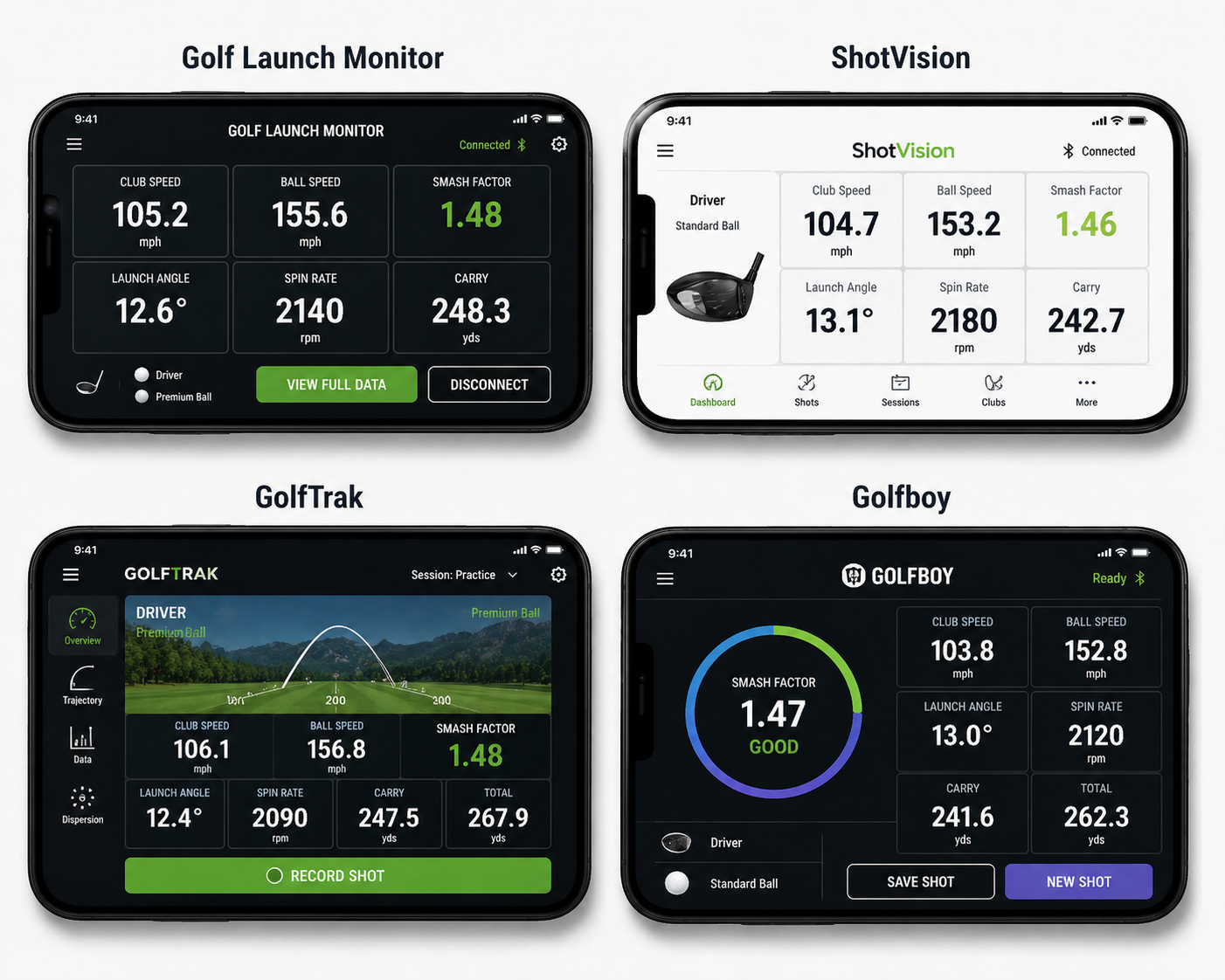
This review covers the four most prominent iPhone launch monitor apps available in 2026, looks honestly at what each one gets right and where each falls short, and explains which golfer each one suits best.
Disclosure: This article is published by Asaru Labs, the developer of the Golf Launch Monitor app. We have done our best to review competing apps fairly and accurately based on publicly available information and App Store data. Where our app is the right recommendation, we say so. Where a competitor better serves a particular need, we say that too.
What to look for in a golf launch monitor app
Before comparing specific apps, it helps to know which features actually matter for most golfers — and which are marketing noise.
The metrics that matter most
Ball speed and launch angle are the two most reliably measured metrics from iPhone camera data. They are geometrically straightforward to derive from frame-by-frame ball tracking and represent the foundation of any useful session. Carry distance — calculated from ball speed, launch angle, and a physics model — is the metric most golfers care about most practically. Club head speed and spin rate are derived values; spin rate in particular is the most technically challenging metric for any camera-based system and varies most between apps.
Free vs. freemium vs. subscription
Almost every app in this category uses a freemium model. The download is free, but key features — typically carry distance, session history, and data export — sit behind a subscription. The meaningful question is not whether the app is free to download, but what the free tier actually gives you and what the subscription unlocks. An app that hides carry distance behind a paywall has limited utility for free users, since carry distance is the number most golfers need most.
Setup requirements and ease of use
All camera-based launch monitor apps require the phone to be positioned correctly — typically 6–8 feet behind the ball on a tripod. Apps vary significantly in how clearly they guide new users through this setup and how forgiving they are of small positioning errors. A technically superior tracking engine does not help if the setup is so fiddly that you spend 15 minutes troubleshooting before hitting your first shot.
Physics model quality
The gap between good apps and mediocre ones is largely in the physics. An app that derives carry distance and spin rate from a proper aerodynamic ball flight model produces more reliable results than one that uses lookup tables or simple trajectory estimation. The best apps in this category use D-Plane physics calculations — the same framework used by professional launch monitor manufacturers — to back-calculate metrics from the observed trajectory.
The four main iPhone launch monitor apps in 2026
Golf Launch Monitor — by Asaru Labs
Free tier: Ball speed, club head speed, launch angle, spin rate, shot dispersion, carry distance
Premium from: $2.99/month
Requires: iOS 17.6 or later, iPhone 8 or newer
Hardware needed: None (tripod strongly recommended)
The Golf Launch Monitor app uses a hybrid ML + optical flow tracking system combined with a D-Plane physics engine — the same ball flight physics framework used by professional launch monitor manufacturers. The key differentiator in the free tier is that carry distance is included at no cost, which is not the case for most competitors. Ball speed, club head speed, launch angle, spin rate, and shot dispersion are all available in the free version.
The app was updated significantly in version 1.1, which rebuilt the physics engine from the ground up using D-Plane calculations for spin rate and carry distance, replacing earlier estimation methods with proper aerodynamic modelling. Version 1.2 addressed false-positive ball detections and improved post-impact metric accuracy.
What it does well: Carry distance is free. The D-Plane physics engine produces reliable spin rate and carry estimates. Setup is straightforward. Shot dispersion tracking is included. Premium features — smart club management, session export as PDF or CSV, and full session history — are meaningfully useful and competitively priced.
What to be aware of: As a newer app in an established category, it has a smaller review base than longer-established competitors. The app is iOS-only.
Best for: Golfers who want carry distance and core metrics without paying a subscription, and who want a physics-rigorous tracking engine for practice and improvement work.
→ Download Golf Launch Monitor free on the App Store
ShotVision
Free tier: Ball speed, club head speed, launch angle (carry distance requires subscription)
Premium: ~$8/month or ~$50/year
Requires: iPhone 11 or newer
Hardware needed: None (tripod recommended)
ShotVision was one of the first iPhone launch monitor apps on the market and has a significant user base as a result. The free tier gives you ball speed, club head speed, and launch angle — which is useful for understanding impact conditions but stops short of carry distance, meaning free users cannot directly measure how far their shots travel.
What it does well: Ball speed and launch angle readings are generally reliable when set up correctly. The app has a straightforward interface that is easy to navigate for new users. The long track record means most early setup and tracking issues have been worked out through updates.
What to be aware of: Carry distance is locked behind the subscription — a significant limitation for free users. Some user reviews note occasional false readings, particularly in low light. The subscription cost is higher than some competitors for a similar feature set.
Best for: Golfers who want a well-established app with a proven track record and are comfortable subscribing for carry distance data.
GolfTrak
Free tier: Core shot metrics with 7-day full-feature trial
Premium: Monthly/annual subscription (pricing varies)
Requires: iOS, iPhone with rear camera
Hardware needed: None
GolfTrak has positioned itself strongly in the indoor simulator integration space — its ability to connect with E6 Connect and GSPro simulator platforms is a genuine differentiator that no other iPhone-only app matches. For golfers who want to use their phone as part of a home simulator setup, GolfTrak has a clear advantage. Its AI models are updated regularly based on accumulated shot data, which means the app improves over time as more golfers use it.
What it does well: Simulator integration (E6 Connect, GSPro) is excellent and genuinely unique in this category. The app is actively developed with frequent updates. Indoor mode has improved significantly in recent versions.
What to be aware of: Ball speed and spin readings can vary more than the app's marketing suggests — independent reviews note these metrics differ more from high-end hardware than carry distance does. The app is most valuable for golfers who also want the simulator integration; purely for range practice, it is not clearly better than alternatives.
Best for: Golfers who want to build a home simulator setup using their iPhone and existing simulator software, rather than purely range-based launch monitor use.
Golfboy
Free tier: Limited — subscription required for measurement features
Premium: ~$6.99/month
Requires: iOS, iPhone with ultra-wide lens for full range (iPhone 11 or newer)
Hardware needed: None (GolfBoy-branded tripod available separately)
Golfboy is one of the highest-rated apps in the category on the App Store and is frequently cited as a standout for its combination of shot measurement and swing video capture. The ability to measure shots up to 280 yards using the ultra-wide lens on newer iPhones is notably ahead of most competitors. The developers update the app frequently and are responsive to user feedback.
What it does well: Shot range (up to 280 yards on compatible iPhones), swing clip capture and comparison, and high App Store ratings reflecting genuine user satisfaction. The combination of video and data in a single app is well executed.
What to be aware of: Measurement features require a subscription — there is no meaningful free tier for data. Some users report the app running devices warm during sessions, which can be a concern on older iPhones. The ultra-wide range advantage applies only to iPhone 11 and newer with an ultra-wide camera.
Best for: Golfers who want swing video capture combined with shot data, and who are comfortable with a subscription from the start.
Side-by-side comparison
| Feature | Golf Launch Monitor | ShotVision | GolfTrak | Golfboy |
|---|---|---|---|---|
| Free carry distance | Yes | No | Trial only | No |
| Free ball speed | Yes | Yes | Trial only | No |
| Free launch angle | Yes | Yes | Trial only | No |
| Free spin rate | Yes | No | Trial only | No |
| D-Plane physics engine | Yes | Not confirmed | Not confirmed | Not confirmed |
| Session export (PDF/CSV) | Premium | Premium | Premium | Premium |
| Shot dispersion tracking | Yes (free) | Premium | Premium | Premium |
| Simulator integration | No | No | Yes | No |
| Swing video capture | No | No | No | Yes |
| Premium pricing | From $2.99/mo | ~$8/mo | Varies | ~$6.99/mo |
Which app is right for you?
| If you want… | Best choice |
|---|---|
| Full core metrics including carry distance, for free, with no subscription required | Golf Launch Monitor — the only app that includes carry distance, spin rate, and dispersion in the free tier |
| A well-established app with a long track record and large user base | ShotVision — the original iPhone launch monitor app, refined over years of updates |
| Home simulator integration with E6 Connect or GSPro | GolfTrak — the only phone-based app with genuine simulator platform integration |
| Swing video capture combined with shot data in a single app | Golfboy — the strongest option for swing video analysis combined with launch data |
| The most accurate physics-based carry distance and spin rate | Golf Launch Monitor — D-Plane physics engine produces the most rigorous ball flight modelling in the category |
| Data-driven range practice with session tracking and export | Golf Launch Monitor (premium) — smart club management, PDF/CSV export, and session history at the lowest subscription price in the category |
Our honest assessment: how far has the category come?
The Rick Shiels review from 2020 that is still widely cited online tested an early version of ShotVision and concluded that iPhone launch monitor apps were "not quite there yet." That was a fair assessment in 2020. It is not a fair characterisation of the category in 2026.
The best iPhone launch monitor apps today produce ball speed and launch angle readings that are consistently within 2–5% of dedicated radar hardware when set up correctly. Carry distance — calculated from a proper physics model — is reliable enough to build real yardage charts from. Spin rate is the metric that still varies most between camera-based systems and hardware radar, but the directional accuracy is sufficient for diagnosing high-spin problems and verifying fixes.
The honest ceiling is this: no iPhone app will replace a TrackMan or GCQuad for tour fittings or elite performance analysis. But for the 99% of golfers who want to understand their swing, track their distances, identify problems, and verify whether practice is working — a well-set-up iPhone launch monitor app is more than sufficient. The question is no longer whether the category works. The question is which app works best for your specific needs.
THE BOTTOM LINE
For golfers who want the most complete free tier — carrying distance, spin rate, ball speed, launch angle, and shot dispersion at no cost — the Golf Launch Monitor app is the strongest option in 2026. For golfers who specifically want simulator integration, GolfTrak is the right choice. For swing video combined with data, Golfboy has the edge. The good news is that all four apps are free to download — try them and let your own data tell you which one works best for your setup and swing.
Try the Golf Launch Monitor app free today.
Ball speed, club head speed, launch angle, spin rate, carry distance, and shot dispersion — all free, from your iPhone camera, no hardware needed. Set up your tripod at the range and see your numbers on the first shot.
Frequently asked questions
Is there a truly free golf launch monitor app for iPhone?
Yes. The Golf Launch Monitor app offers ball speed, club head speed, launch angle, spin rate, carry distance, and shot dispersion in its free tier — no subscription required for core metrics. Most competitors lock carry distance behind a subscription, making them effectively paid apps for practical use.
How accurate are iPhone golf launch monitor apps in 2026?
Ball speed and launch angle are reliably within 2–5% of dedicated radar hardware when set up correctly with a stable tripod and good lighting. Carry distance — derived from a proper physics model — is accurate enough for real yardage calibration. Spin rate is the most technically challenging metric and varies more between apps and setups. See our full accuracy breakdown for more detail.
Do I need a tripod to use a golf launch monitor app?
Technically no — but practically yes. A phone that moves during the swing introduces significant error into every metric, particularly ball speed and carry distance. A small flexible tripod costs $15–30 and makes the difference between reliable data and unreliable noise. Every app in this category performs noticeably better with a stable mounting solution.
Which iPhone golf launch monitor app is best for beginners?
The Golf Launch Monitor app is the strongest starting point for beginners because the full core metrics — including carry distance — are available for free. A beginner can measure their distances for every club, understand their launch angle, and track basic dispersion without spending anything. If they find the data useful and want session export and club management tools, premium is available from $2.99/month.
Can I use a golf launch monitor app indoors?
Yes, with the right setup. You need at least 8 feet of clear ball flight in front of the ball. An indoor net placed at least 8 feet from the ball is the standard indoor setup. Good, consistent lighting is important — the biggest challenge indoors is giving the camera enough contrast to track the ball reliably. The Golf Launch Monitor app works in both indoor and outdoor environments.
Is GolfTrak better than ShotVision?
It depends entirely on what you need. GolfTrak is the better choice if you want simulator integration with E6 Connect or GSPro. ShotVision has a longer track record and a larger user base for pure range use. Neither offers carry distance free. For golfers who want core metrics including carry distance without a subscription, the Golf Launch Monitor app is the more practical option than either.
best free golf launch monitor app iPhonegolf launch monitor app reviewbest iPhone golf launch monitor 2026ShotVision reviewGolfTrak reviewfree golf app iPhonegolf launch monitor app comparisoniPhone golf tracking app